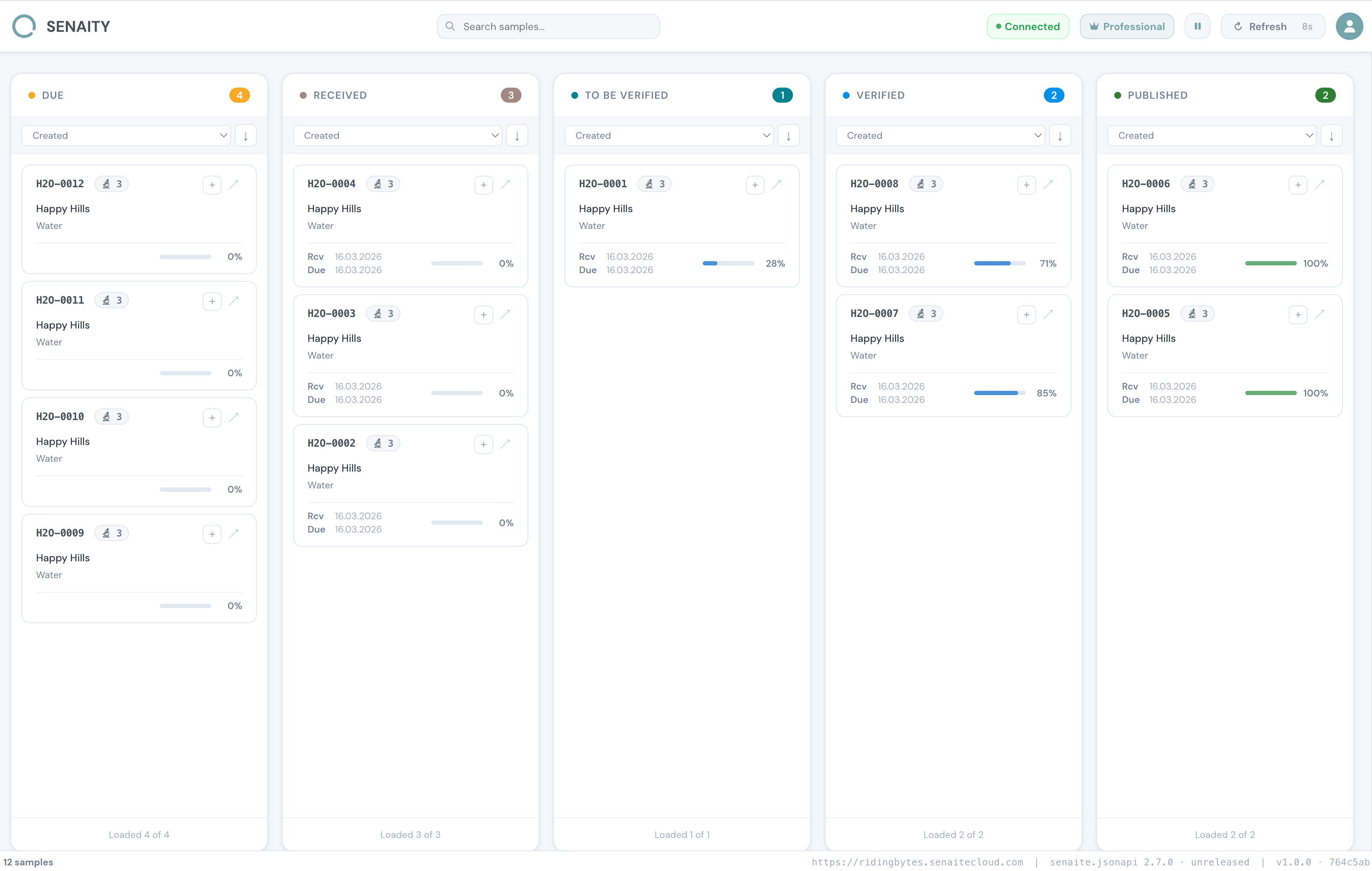
SENAITY watches every analysis flowing through your SENAITE LIMS, flags the values that don't fit your historical pattern, and lets you compare samples side by side — so you spot the problem before it leaves the lab.
Anomaly detection on every analysis, side-by-side sample comparison, and a fast Kanban for routine review. All five features are included on every plan — including the free hosted demo.
Catches suspicious numeric results before they leave the lab. Trained on your verified history. No configuration, no tagging, no rules to maintain.
Compare multiple samples side by side — no other LIMS tool does this out of the box.
Slide-in drawer with full context on individual samples and analyses.
Live sample status overview at a glance, with real-time updates.
Proactive alerts when your SENAITE instance needs attention.
Three views, one dashboard. Switch between Board, Table comparison, and Chart comparison — including %RSD and distribution charts.
Kanban Board Screenshot
Placescreenshot-board.png in the landing/ folder
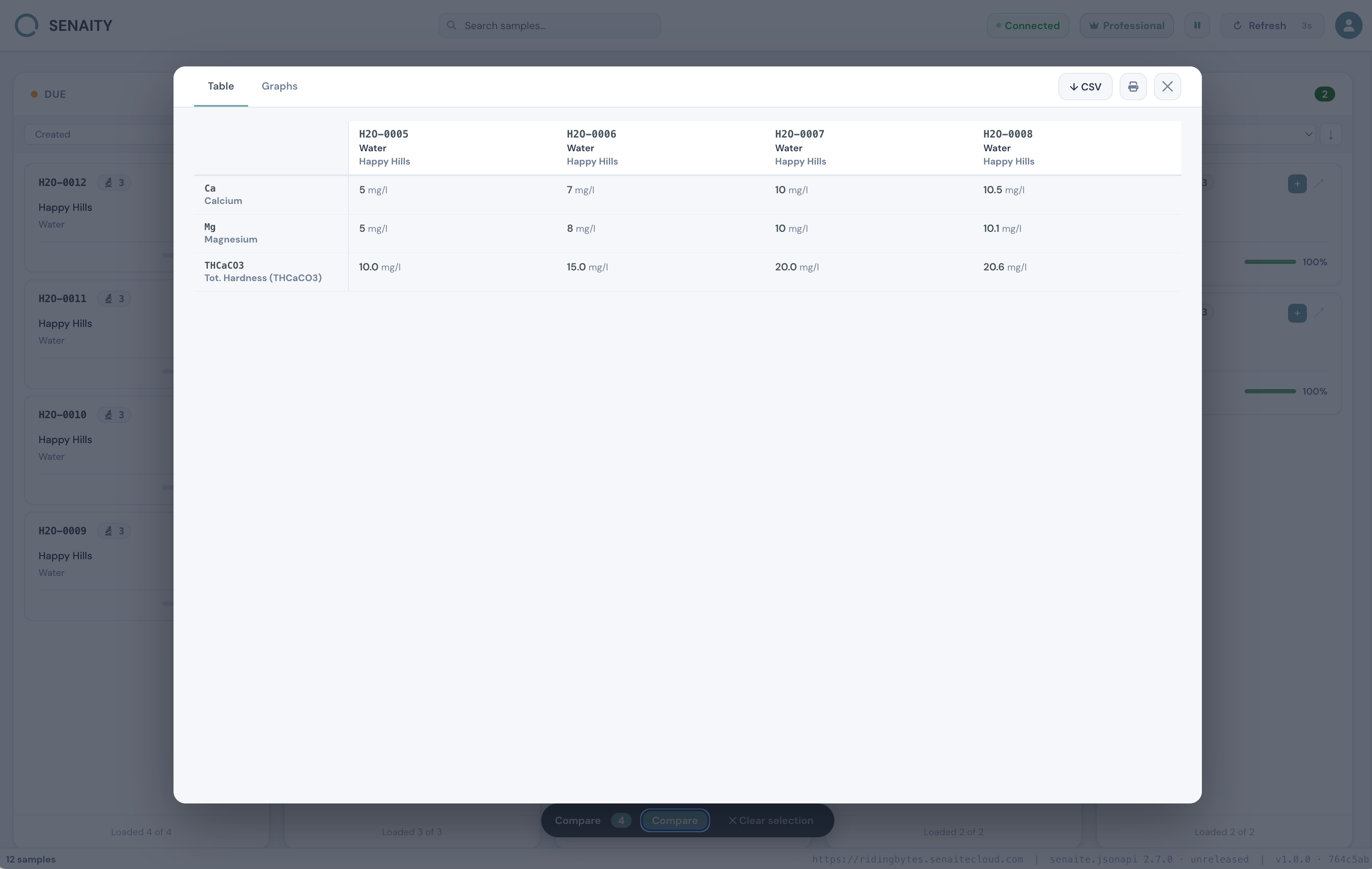
Table Comparison Screenshot
Placescreenshot-table.png in the landing/ folder
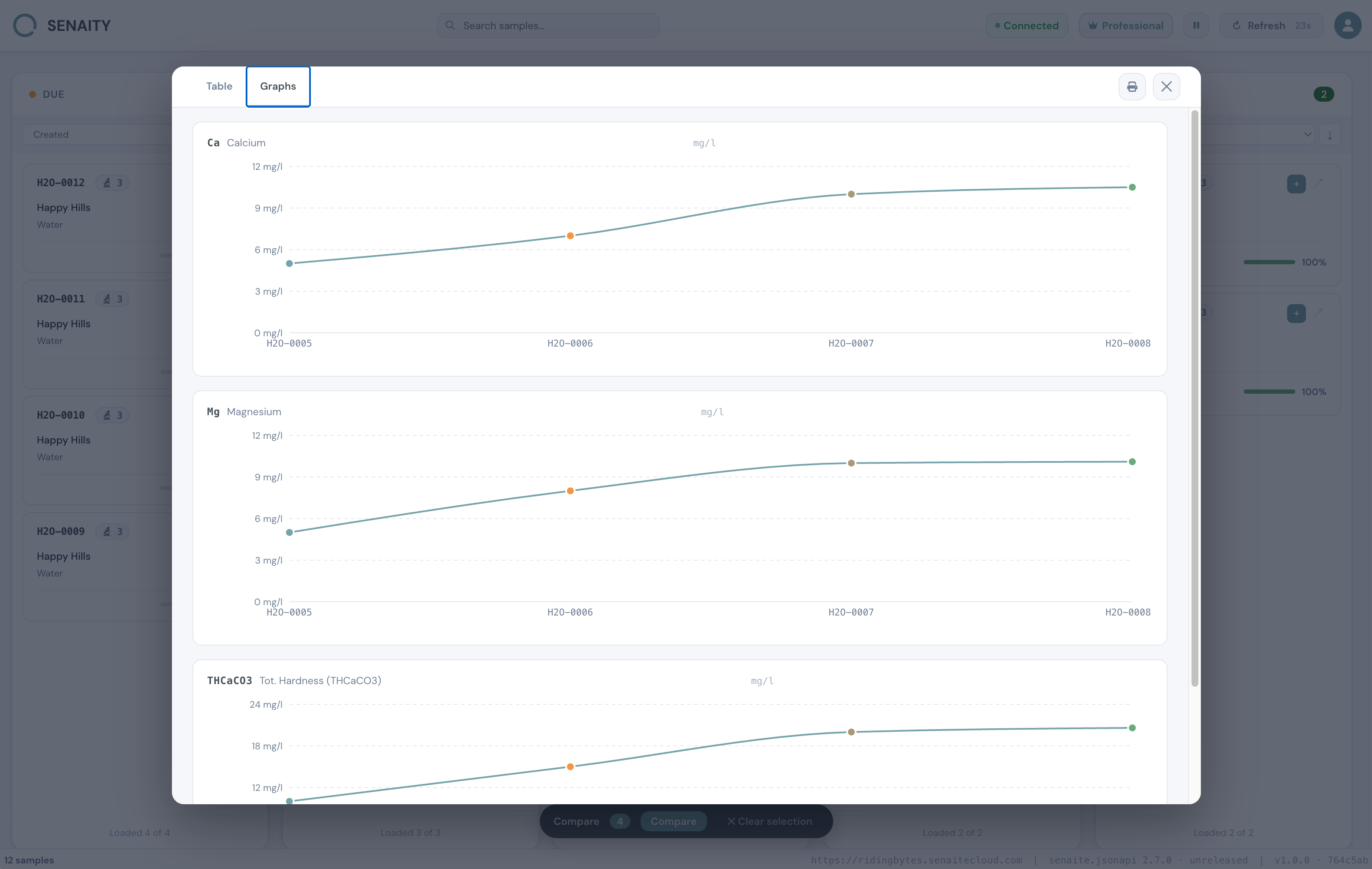
Chart Comparison Screenshot
Placescreenshot-graphs.png in the landing/ folder
Use the free hosted demo, or run SENAITY on your own infrastructure with our Docker Compose package. Either way, it points at your existing SENAITE — no migration, no schema changes.
Open the hosted demo at senaity.com/app for a public-facing SENAITE, or request the Standalone Docker package for any lab handling regulated or sensitive data.
Point SENAITY to your SENAITE URL and sign in with your existing SENAITE credentials. No new accounts, no extra plugins on the SENAITE side.
SENAITY trains an Isolation Forest on your verified history and starts flagging anomalous results immediately. Compare suspicious samples side by side, drill into the analyses, decide before publishing.
Free hosted demo for public-internet SENAITE. Standalone Docker for everyone else. All paid plans billed annually by invoice — no card, no subscription.
SENAITY is the quality-assurance layer for SENAITE LIMS. It watches every analysis flowing through your SENAITE, flags values that don't fit your historical pattern using machine learning, and lets you compare samples side by side — so you spot problems before results leave the lab. It is built by RIDING BYTES, the team that builds and supports SENAITE itself.
If your SENAITE is reachable on the public internet and your lab does not handle regulated or sensitive data, use the free hosted demo at senaity.com/app/ — it has every feature, including anomaly detection, and you can stay on it indefinitely. If your SENAITE is behind a firewall, or you handle medical, pharma, GxP, IAEA or public-sector data, choose the Standalone Docker Lab plan. SENAITY runs in your own network next to your SENAITE; nothing leaves your premises.
Depends on the deployment. For the hosted demo: nothing. Sign up at senaity.com/app/, give us your SENAITE URL and credentials, and the dashboard works in your browser. For Standalone Docker: a single docker compose up on a small server (or VM) in your network — three containers totalling ~450 MB of memory. No changes to SENAITE itself; no plugins, no schema migration.
Yes — and we recommend it for any lab handling regulated or sensitive data. SENAITY ships as a Docker Compose package that runs next to your SENAITE on your own infrastructure. No data leaves your network, no proxy in between, no phone-home. The Lab plan (€490/mo, annual invoice) bundles the package, software updates, and email support. Contact us at hello@ridingbytes.com for the package and a setup walkthrough.
On Standalone Docker: lab data never leaves your network. SENAITY runs inside your perimeter; we have no access. On the hosted demo: SENAITY is a read-only dashboard — it never writes to your SENAITE. Your SENAITE credentials are encrypted at rest with AES-256-GCM. The anomaly service trains short-lived models in memory and discards them after one hour. We do not store your lab results in a database on our servers; the dashboard simply pulls data through to your browser on demand. If that is still too close for your compliance team, you want Standalone.
When you open a sample, numeric analysis results are sent to the anomaly service. It queries your SENAITE for verified historical data on the same analysis keyword and client, trains a short-lived Isolation Forest model on that history, and scores each result against it. You get a percentile, the mean, and the deviation — visible as a badge on every flagged result. Models are trained on demand and cached in memory for one hour; nothing is persisted to disk. On Standalone the service runs in your network; on the hosted demo it runs on senaity.com but processes only the data it queries from your SENAITE in real time.
Yes — use the Standalone Docker Lab plan. SENAITY runs inside your network alongside SENAITE, so there is no firewall to open and nothing to expose to the public internet. This is the right path for any regulated, clinical, pharma, or public-sector environment. If you really need the hosted demo with a firewalled SENAITE, you can whitelist our fixed VPS IP address (145.223.97.50) on the port SENAITE listens on — but we do not recommend it for sensitive data. Contact hello@ridingbytes.com if you would like help deciding.
Lab is €490/mo or €4,900/yr (annual invoice — 16% saving) and bundles the Standalone Docker package, all features, software updates, and email support for a single SENAITE instance. Group is €1,490/mo (or €14,900/yr) and includes 3 SENAITE instances + central anomaly history + priority support. Enterprise starts at €30,000/yr on a custom annual contract and adds SSO, audit log, IQ/OQ documentation, SLA, source-code escrow on request, and a dedicated technical contact. All paid plans are invoice-based: email hello@ridingbytes.com with your lab name and we will send a quote.
All modern browsers — Chrome, Firefox, Safari, Edge. SENAITY is fully responsive and works on tablets and phones too; useful for lab managers checking status on the go and for the anomaly badge being legible on a small screen.
The Mark
The Ensō — a single brushstroke forming an almost-complete circle — is one of Zen Buddhism's most enduring symbols. Drawn in one uninterrupted motion, it stands for clarity, wholeness, and the universe in a single gesture.
The open gap is deliberate. It means the circle is alive — still in motion, never sealed, always becoming.
A lab is the same: never finished, always moving, yet complete in any given moment. SENAITY is built for that moment.